Pinned messages #162

Open
opened 2026-04-06 15:29:56 +00:00 by hodlbod · 9 comments
Owner

Allow admins to pin chat messages to the top of a room. This will require protocol work, since I don't think nip29 supports this, as well as design work.

Allow admins to pin chat messages to the top of a room. This will require protocol work, since I don't think nip29 supports this, as well as design work.
hodlbod added this to the Current milestone 2026-04-06 15:29:56 +00:00
hodlbod added the idea label 2026-04-06 15:29:56 +00:00
hodlbod added this to the Spaces and Rooms project 2026-04-06 15:29:56 +00:00
Khushvendra self-assigned this 2026-04-06 17:16:18 +00:00
Contributor

@hodlbod Want to give this a shot, if it is okay with you?

@hodlbod Want to give this a shot, if it is okay with you?
Khushvendra removed their assignment 2026-04-06 17:16:52 +00:00
Khushvendra was assigned by hodlbod 2026-04-06 19:05:44 +00:00
Author
Owner

Yep, have at it.

Yep, have at it.
Khushvendra was unassigned by hodlbod 2026-04-09 21:44:22 +00:00
Collaborator

I have some familiarity with design, so I created a mockup for this (see attached image).

Screenshot 2026-04-15 at 4.25.08 PM.png

The idea is that if a message is pinned and a user enters the room afterward, a highlighted banner (in purple) will appear showing the pinned message, along with View and Dismiss actions. (Instead of using an emoji for pin, we can use the current icon pack for consistent design)

Clicking View will automatically scroll to the pinned message, while Dismiss will hide the banner. After dismissing, both admins and members can still access pinned messages through a modal or a UI similar to search results (aligned with the refined search template).

I’ve also explored an alternative sidebar design for displaying pinned messages.

Screenshot 2026-04-15 at 4.22.49 PM.png

Pinning a message (discord flow, modal, but our design)

B4GpJ4fjKVi9esIoREPNZxjRlUQvKfkZq1TvPlzTz9dxdEHH1l52baK88H-bSQfYTKWM5VoeC-HK-9XEUNEuKddkYEuH3IOId2txIkOSVrzzQ6-0OXc4NmLx01hy6RaBPlholbP4rMG6WPthVPfauxvVh19RkNpsuxK3Cg-_608.jpeg

@hodlbod, thoughts ?

If everything looks good, I’ll assign it to myself and open a PR so we can continue the discussion there after the actual development part.

I have some familiarity with design, so I created a mockup for this (see attached image). <img width="1028" alt="Screenshot 2026-04-15 at 4.25.08 PM.png" src="attachments/35bfa879-2767-492d-b4a6-259d96518b95"> The idea is that if a message is pinned and a user enters the room afterward, a highlighted banner (in purple) will appear showing the pinned message, along with View and Dismiss actions. (Instead of using an emoji for pin, we can use the current icon pack for consistent design) Clicking View will automatically scroll to the pinned message, while Dismiss will hide the banner. After dismissing, both admins and members can still access pinned messages through a modal or a UI similar to search results (aligned with the refined search template). I’ve also explored an alternative sidebar design for displaying pinned messages. <img width="1010" alt="Screenshot 2026-04-15 at 4.22.49 PM.png" src="attachments/14f21386-8a0b-4fdf-b40b-119f94ea1733"> **Pinning a message (discord flow, modal, but our design)** ![B4GpJ4fjKVi9esIoREPNZxjRlUQvKfkZq1TvPlzTz9dxdEHH1l52baK88H-bSQfYTKWM5VoeC-HK-9XEUNEuKddkYEuH3IOId2txIkOSVrzzQ6-0OXc4NmLx01hy6RaBPlholbP4rMG6WPthVPfauxvVh19RkNpsuxK3Cg-_608.jpeg](/attachments/300025e8-231c-42e0-8f25-156d0d3d6092) @hodlbod, thoughts ? If everything looks good, I’ll assign it to myself and open a PR so we can continue the discussion there after the actual development part.
Author
Owner

I'm not sure, would you mind mocking up how this might look if included in the top bar instead? I don't mind the idea of making the info icon open a side bar instead of a modal, but I don't want too many icons in the top nav. Or maybe we could attach the pinned message to the bottom of the top bar. A few more iterations would be good at any rate.

I'm not sure, would you mind mocking up how this might look if included in the top bar instead? I don't mind the idea of making the info icon open a side bar instead of a modal, but I don't want too many icons in the top nav. Or maybe we could attach the pinned message to the bottom of the top bar. A few more iterations would be good at any rate.
Collaborator

I'm not sure, would you mind mocking up how this might look if included in the top bar instead? I don't mind the idea of making the info icon open a side bar instead of a modal, but I don't want too many icons in the top nav. Or maybe we could attach the pinned message to the bottom of the top bar. A few more iterations would be good at any rate.

Single Pinned Message (Admin Perspective)
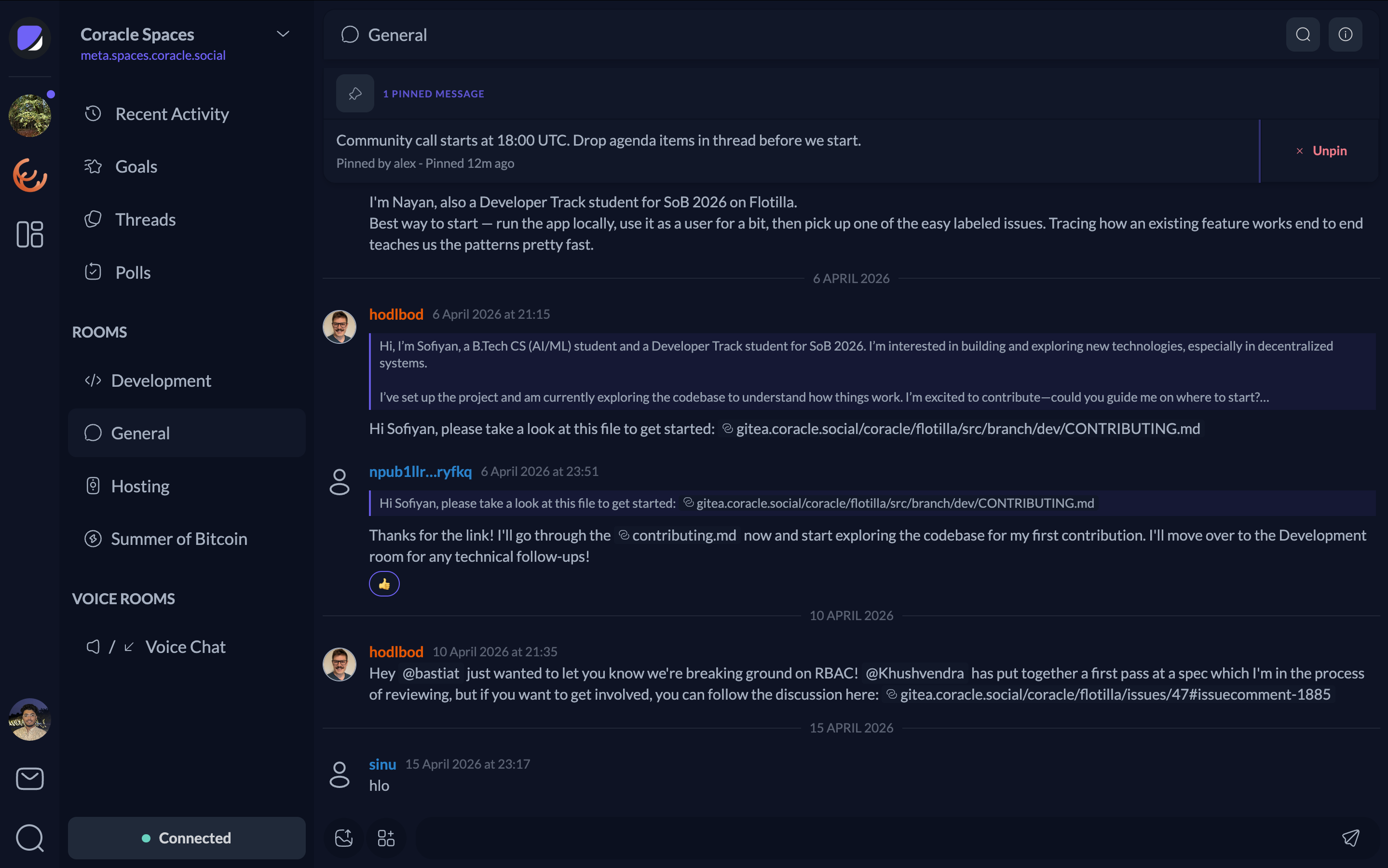
Screenshot 2026-04-17 at 6.31.52 PM.png

Admin View Showing Three Pinned Messages Area
Screenshot 2026-04-17 at 6.31.41 PM.png

Admin View with Multiple Pinned Messages (Scrollable for More)
Screenshot 2026-04-17 at 6.35.39 PM.png

User View: Large Messages Include a “Read Full” Button to Open the Original Message
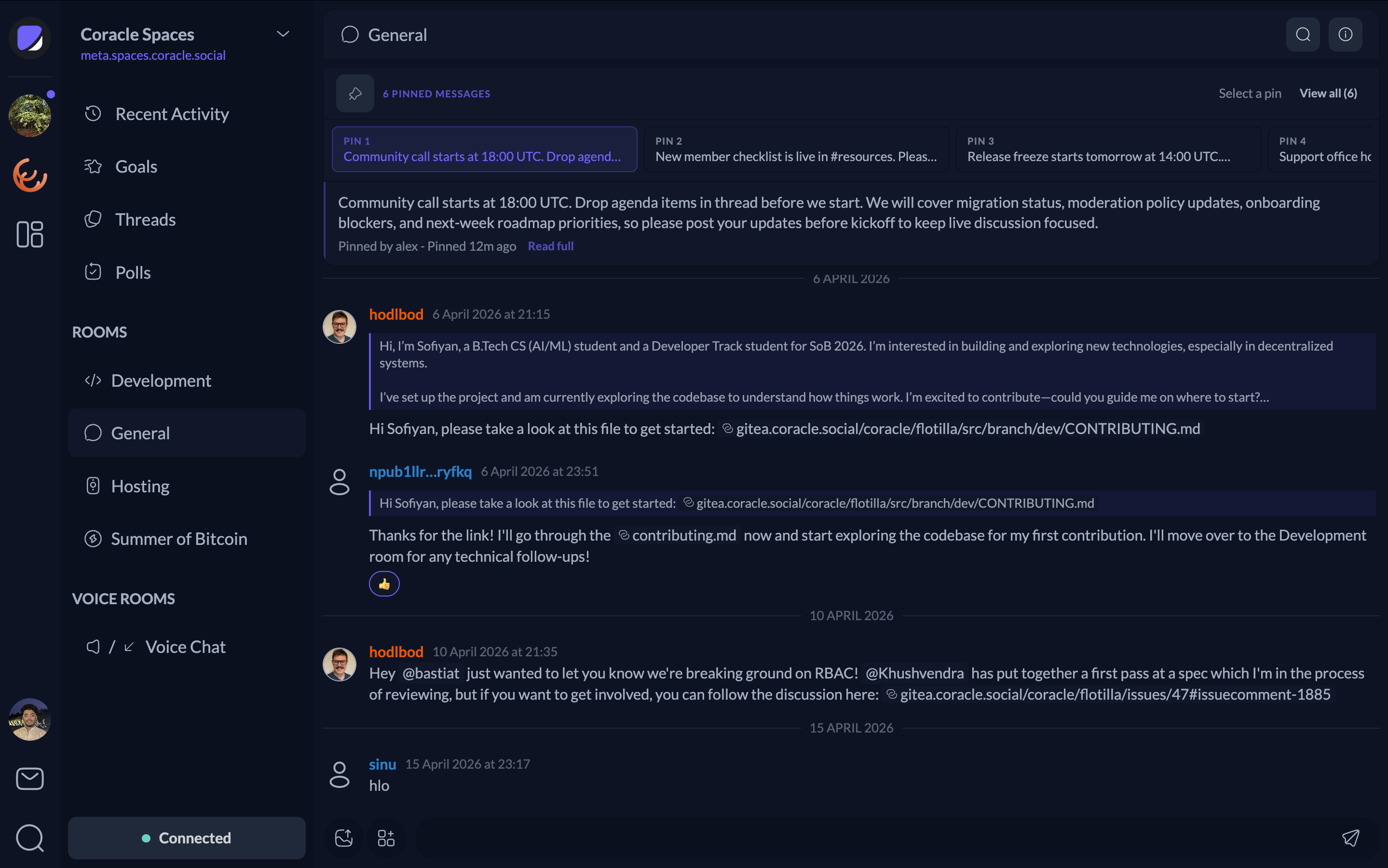
Screenshot 2026-04-17 at 6.39.43 PM.png

User View: Light Theme Pinned Messages Panel
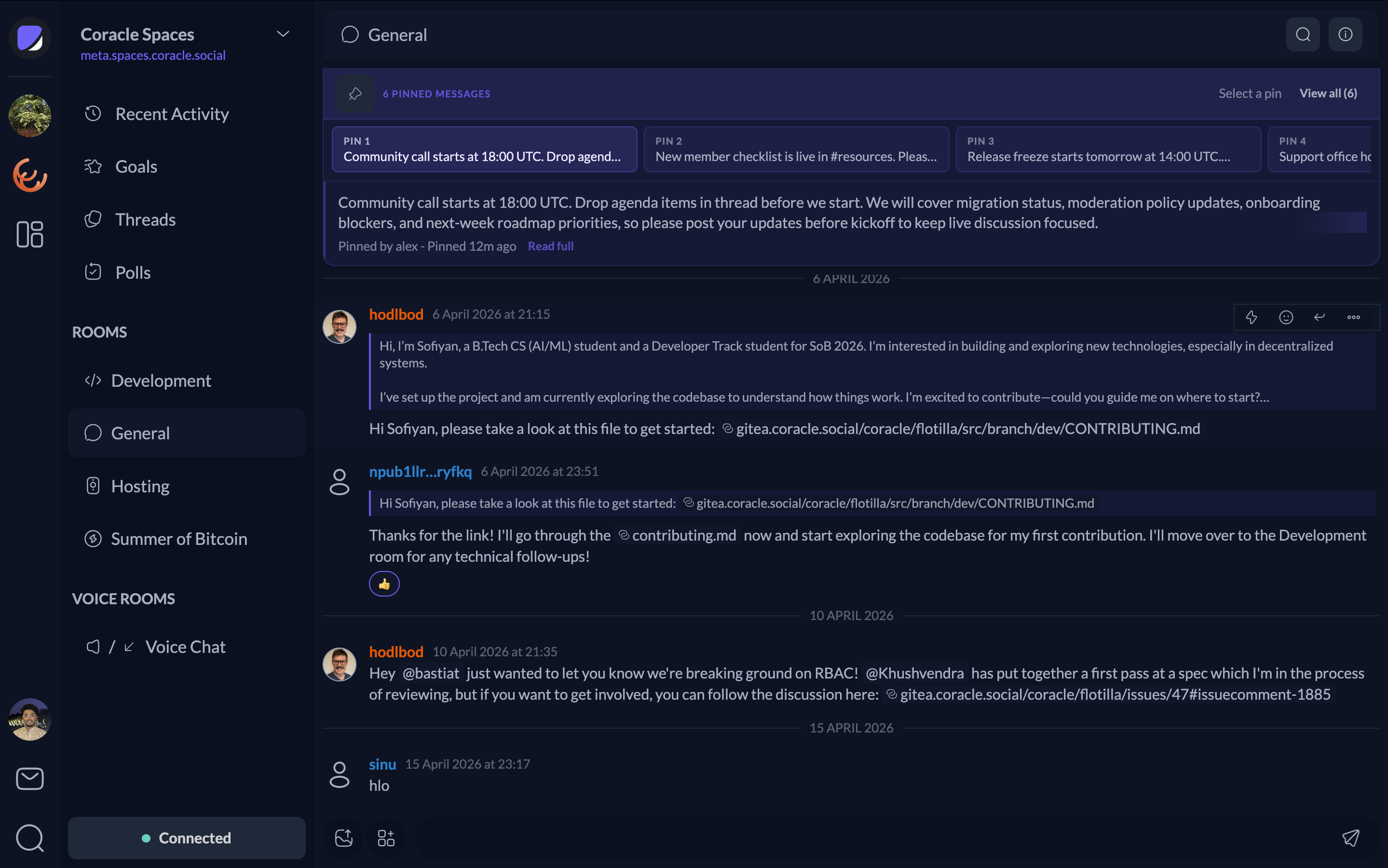
Screenshot 2026-04-17 at 6.48.09 PM.png

> I'm not sure, would you mind mocking up how this might look if included in the top bar instead? I don't mind the idea of making the info icon open a side bar instead of a modal, but I don't want too many icons in the top nav. Or maybe we could attach the pinned message to the bottom of the top bar. A few more iterations would be good at any rate. **Single Pinned Message (Admin Perspective)** <img width="1439" alt="Screenshot 2026-04-17 at 6.31.52 PM.png" src="attachments/3e54526e-c56b-40fc-89a7-92b402e619bb"> **Admin View Showing Three Pinned Messages Area** <img width="1439" alt="Screenshot 2026-04-17 at 6.31.41 PM.png" src="attachments/c377507b-869a-4c42-83eb-256c5d88e438"> **Admin View with Multiple Pinned Messages (Scrollable for More)** <img width="1439" alt="Screenshot 2026-04-17 at 6.35.39 PM.png" src="attachments/94d95637-e612-4511-8990-7766b3e95d61"> **User View: Large Messages Include a “Read Full” Button to Open the Original Message** <img width="1439" alt="Screenshot 2026-04-17 at 6.39.43 PM.png" src="attachments/38db71bb-50f8-4f9c-8cb9-4dad29cd5cdd"> **User View: Light Theme Pinned Messages Panel** <img width="1439" alt="Screenshot 2026-04-17 at 6.48.09 PM.png" src="attachments/a7043974-97bf-48df-8924-76ddef69e247">
Author
Owner

Looks pretty good, but I'd like something a little lighter. What about something like the attached, and when you click on the pinned message it scrolls to that message and updates the x/y number so users can cycle through all messages. Maybe we could add an icon button too that opens a dialog showing all pinned messages with the ability to un-pin them if the user has permission.

Looks pretty good, but I'd like something a little lighter. What about something like the attached, and when you click on the pinned message it scrolls to that message and updates the `x/y` number so users can cycle through all messages. Maybe we could add an icon button too that opens a dialog showing all pinned messages with the ability to un-pin them if the user has permission.
Collaborator

I also noticed that the previous design made the main view feel a bit cluttered. Based on your suggestion, I’ve reworked it into a lighter version, sharing the updated screenshots and screencasts here for reference.

Screenshot 2026-04-18 at 4.23.49 PM.png Screenshot 2026-04-18 at 4.24.01 PM.png

The pinned message stack resets to 1/(n) when you navigate away and return to the space.

lighter theme to better distinguish between the top bar and the pinned panel
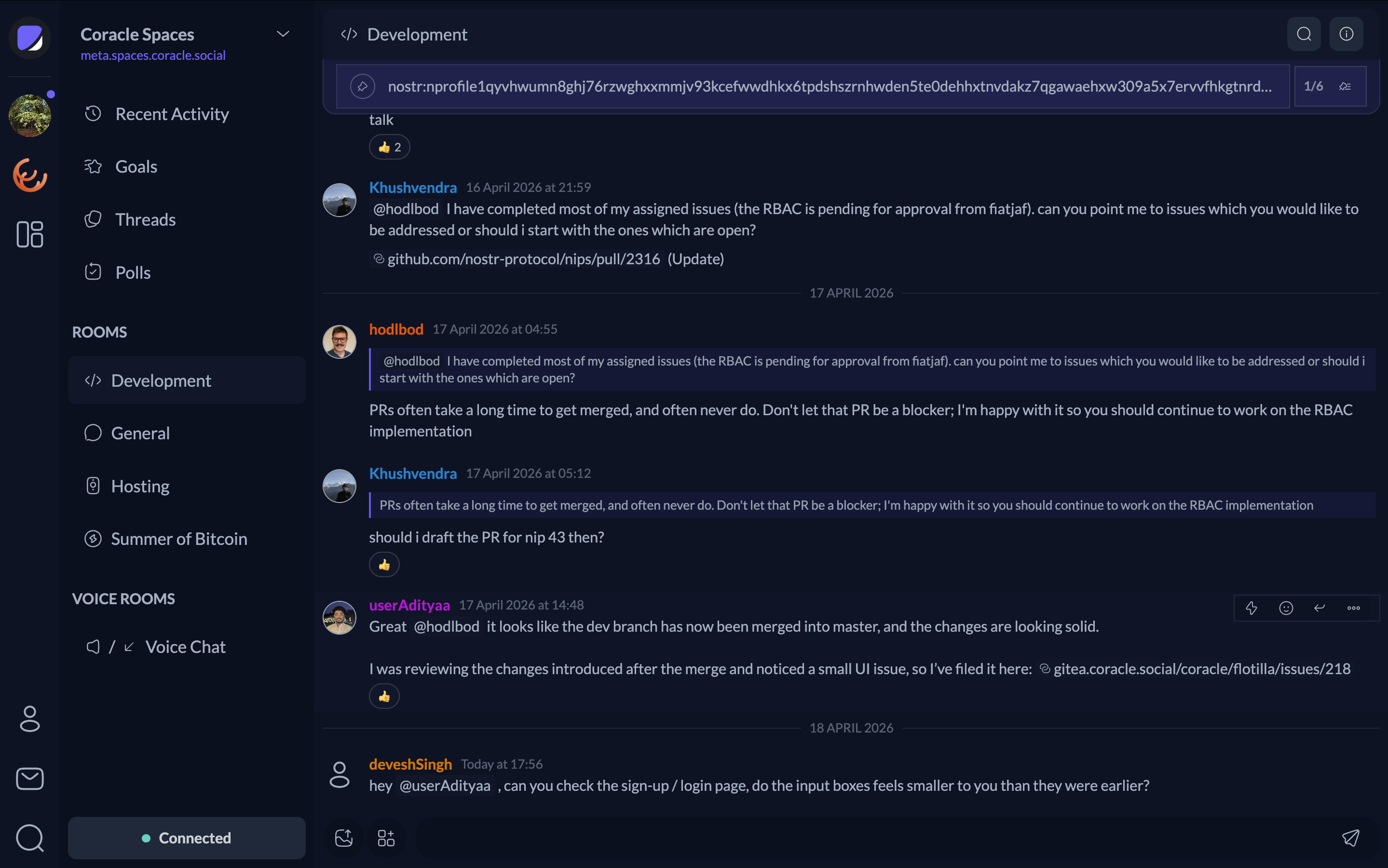
Screenshot 2026-04-18 at 6.13.12 PM.png

I also noticed that the previous design made the main view feel a bit cluttered. Based on your suggestion, I’ve reworked it into a lighter version, sharing the updated screenshots and screencasts here for reference. <img width="1439" alt="Screenshot 2026-04-18 at 4.23.49 PM.png" src="attachments/6d407fff-7bf4-4791-a6f4-7e8e394bcda7"> <img width="1439" alt="Screenshot 2026-04-18 at 4.24.01 PM.png" src="attachments/412a864c-ac66-4040-82b2-c5f367ece085"> <video src="attachments/0d459bfd-5c8c-4f10-92cc-58775cc332f6" title="Screen Recording 2026-04-18 at 4.20.58 PM.mp4" controls></video> The pinned message stack resets to 1/(n) when you navigate away and return to the space. **lighter theme to better distinguish between the top bar and the pinned panel** <img width="1439" alt="Screenshot 2026-04-18 at 6.13.12 PM.png" src="attachments/c125f7e8-6e88-4802-8c38-c336a71270cf">
Author
Owner

Cool, looks good enough to move to dev. I would like to see something a little more interesting though, maybe a card that peeks out from under the header.

Cool, looks good enough to move to dev. I would like to see something a little more interesting though, maybe a card that peeks out from under the header.
Collaborator

Cool, looks good enough to move to dev. I would like to see something a little more interesting though, maybe a card that peeks out from under the header.

Yes, I’ll iterate further on the design before finalizing it for the dev environment. Adding some more engaging interactions or subtle animations for the pin panel should help make it feel more polished.

> Cool, looks good enough to move to dev. I would like to see something a little more interesting though, maybe a card that peeks out from under the header. Yes, I’ll iterate further on the design before finalizing it for the dev environment. Adding some more engaging interactions or subtle animations for the pin panel should help make it feel more polished.
userAdityaa self-assigned this 2026-04-20 13:31:30 +00:00
userAdityaa was unassigned by hodlbod 2026-05-06 16:35:33 +00:00
Sign in to join this conversation.
3 Participants
Notifications
Due Date
No due date set.
Dependencies

No dependencies set.

Reference: coracle/flotilla#162