Add reaction details view on mobile (parity with desktop) #175

Open
opened 2026-04-08 17:30:08 +00:00 by sakshamjain · 4 comments
Collaborator

Description:
On desktop, users can hover over a reaction emoji to see who reacted to a message. This functionality is currently missing on mobile, where there is no way to view reaction details.

Desktop: shows reaction details on hover
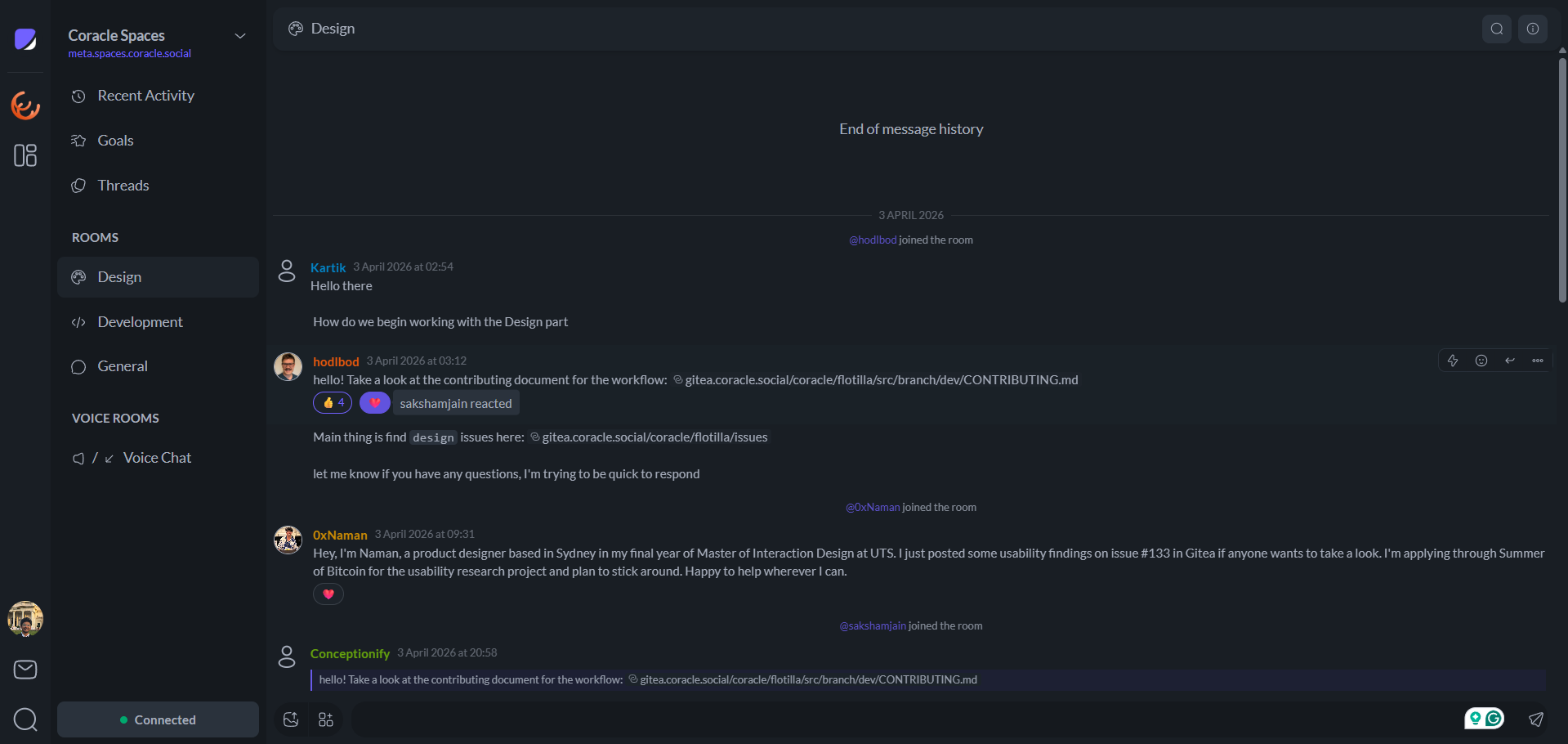
Screenshot 2026-04-08 225327.png

Expected behavior:
On mobile, long-pressing (holding) a reaction emoji should show the list of users who reacted, similar to the hover behavior on desktop.

Mobile: no way to view reaction details
Screenshot_20260408-225317.Flotilla.png

Description: On desktop, users can hover over a reaction emoji to see who reacted to a message. This functionality is currently missing on mobile, where there is no way to view reaction details. Desktop: shows reaction details on hover <img width="1439" alt="Screenshot 2026-04-08 225327.png" src="attachments/359f6d7b-3c6c-4d02-be2a-de91ba740fb6"> Expected behavior: On mobile, long-pressing (holding) a reaction emoji should show the list of users who reacted, similar to the hover behavior on desktop. Mobile: no way to view reaction details ![Screenshot_20260408-225317.Flotilla.png](/attachments/4722b15c-a4a4-40ff-8c74-a8e6385b9d00)
hodlbod added the design label 2026-04-08 17:41:52 +00:00
hodlbod added this to the Future milestone 2026-04-08 17:41:59 +00:00
Owner

A good candidate for genuine usability testing I think.

A good candidate for genuine usability testing I think.
hodlbod added usability and removed design labels 2026-04-08 17:42:57 +00:00
Author
Collaborator

That makes sense. I’ll explore a few interaction patterns for viewing reaction details on mobile and share options for validation.

That makes sense. I’ll explore a few interaction patterns for viewing reaction details on mobile and share options for validation.
Author
Collaborator

Reaction Details on Mobile: Usability Testing Report

Description

Based on usability testing and interaction benchmarking, I explored multiple patterns to bring reaction detail visibility (desktop hover parity) to mobile in a way that feels intuitive, discoverable, and low-friction.

PS: This is solely and specifically created by me and is not AI-generated content.

What is the current Behaviour?

Tap Reaction → Toggle Add/Remove

Current System:

  • Tap into existing reactions → adds your reaction in that specific emoji
  • Tap your existing reaction → removes it for that specific emoji

Issues Identified:

  • No way to view who reacted
  • Removal is a non-primary action but occupies a primary gesture
  • Users accidentally add reactions when trying to inspect

Key Insight from Testing

  • Mobile lacks hover affordance, so discoverability becomes the biggest challenge
  • Users expect:
    Tap = immediate action
    Long press = secondary / contextual action
  • Overloading tap interactions leads to accidental actions (especially with links)

Explored Interaction Patterns

1. Tap Message → Open Menu → “View Reactions”

Flow: Tap message → Existing menu opens → “View reactions” option along with existing "Send Reactions"

Pros:

  • Reuses existing pattern (low learning curve)
  • Keeps reactions as a secondary action

Cons (Observed):

  • Opening single tap menu conflicts with links inside messages (high-frequency issue)
  • Low discoverability, users don’t associate message tap with actions menu
  • Adds friction (2-step interaction)

2. Long Press Message → Show Reactions

Flow: Hold message → Reaction details shown only

Pros:

  • Aligns with mobile mental model (long press = more options)
  • Avoids link conflict

Cons:

  • Indirect mapping, reactions are tied to emojis, not the entire message
  • Feels less precise (users expect to interact with the emoji itself)

3. Tap Reaction → Open Reaction Details

Flow: Tap reaction → Opens bottom sheet / modal with users list → View other's rections

Pros:

  • Direct mapping (tap emoji → see details)
  • Matches user intent from testing
  • Reduces accidental reactions or removals
  • Scales well for multiple reactions

Cons:

  • Slight behavior change from current system (needs adaptation)

Tradeoff:

  • To register a new reaction, we will have to use either method 1 or another intuitive method, like a "+ " icon stacked inline at the end of all reactions, hence the user can click on the plus icon to register a new reaction.

4. Dual Interaction Model (Tap + Long Press Split)

Flow:

Single Tap on Emoji → Adds or removes the reaction (Existing)
Hold specific emoji → Show users list with ability to view others reaction + Add your own + Remove your own

Pros:

  • Most semantically accurate interaction
  • No conflict with existing tap behaviour

Cons:

  • Slower discoverability

5. Bottom Sheet on Any Reaction Interaction

Flow: Tap reaction → Bottom sheet opens:

Shows users
Shows all reactions
Allows add/remove

Pros:

  • Consolidated experience
  • Familiar pattern (Instagram/Slack-like)
  • Highly scalable

Cons:

  • Slightly heavier interaction than quick tap add/remove

Key Takeaways from Testing

  • Users strongly associate reactions with the emoji itself, not the message
  • Tap should prioritise clarity over speed (avoid accidental actions)
  • Discoverability > efficiency for this feature
  • Hidden gestures (long press) work best as secondary enhancements, not primary flows

Optional suggestion (In case not using the long press optons):

We can keep long press on reaction → same behaviour as the one we select finally (power users)

This usability testing will help us

  • Match user intent directly
  • Eliminates accidental reactions
  • Improves clarity + transparency
  • Aligns with patterns seen in modern messaging apps
  • Scales for future features (e.g., sorting, filtering reactions)

@hodlbod , please let me know which test cases you want mockups created for. I am very excited to work on this. Working on this was a great experience of getting into so much detail for a reaction interaction. I also have some other interactions and flows in mind. Do let me know if you'd like me to explore further.

## Reaction Details on Mobile: Usability Testing Report ### Description Based on usability testing and interaction benchmarking, I explored multiple patterns to bring reaction detail visibility (desktop hover parity) to mobile in a way that feels intuitive, discoverable, and low-friction. PS: This is solely and specifically created by me and is not AI-generated content. ### What is the current Behaviour? **Tap Reaction → Toggle Add/Remove** Current System: - Tap into existing reactions → adds your reaction in that specific emoji - Tap your existing reaction → removes it for that specific emoji Issues Identified: - No way to view who reacted - Removal is a non-primary action but occupies a primary gesture - Users accidentally add reactions when trying to inspect ### Key Insight from Testing - Mobile lacks hover affordance, so discoverability becomes the biggest challenge - Users expect: Tap = immediate action Long press = secondary / contextual action - Overloading tap interactions leads to accidental actions (especially with links) ### Explored Interaction Patterns **1. Tap Message → Open Menu → “View Reactions”** Flow: Tap message → Existing menu opens → “View reactions” option along with existing "Send Reactions" Pros: - Reuses existing pattern (low learning curve) - Keeps reactions as a secondary action Cons (Observed): - Opening single tap menu conflicts with links inside messages (high-frequency issue) - Low discoverability, users don’t associate message tap with actions menu - Adds friction (2-step interaction) **2. Long Press Message → Show Reactions** Flow: Hold message → Reaction details shown only Pros: - Aligns with mobile mental model (long press = more options) - Avoids link conflict Cons: - Indirect mapping, reactions are tied to emojis, not the entire message - Feels less precise (users expect to interact with the emoji itself) **3. Tap Reaction → Open Reaction Details** Flow: Tap reaction → Opens bottom sheet / modal with users list → View other's rections Pros: - Direct mapping (tap emoji → see details) - Matches user intent from testing - Reduces accidental reactions or removals - Scales well for multiple reactions Cons: - Slight behavior change from current system (needs adaptation) Tradeoff: - To register a new reaction, we will have to use either method 1 or another intuitive method, like a "+ " icon stacked inline at the end of all reactions, hence the user can click on the plus icon to register a new reaction. **4. Dual Interaction Model (Tap + Long Press Split)** Flow: Single Tap on Emoji → Adds or removes the reaction (Existing) Hold specific emoji → Show users list with ability to view others reaction + Add your own + Remove your own Pros: - Most semantically accurate interaction - No conflict with existing tap behaviour Cons: - Slower discoverability **5. Bottom Sheet on Any Reaction Interaction** Flow: Tap reaction → Bottom sheet opens: Shows users Shows all reactions Allows add/remove Pros: - Consolidated experience - Familiar pattern (Instagram/Slack-like) - Highly scalable Cons: - Slightly heavier interaction than quick tap add/remove ### Key Takeaways from Testing - Users strongly associate reactions with the emoji itself, not the message - Tap should prioritise clarity over speed (avoid accidental actions) - Discoverability > efficiency for this feature - Hidden gestures (long press) work best as secondary enhancements, not primary flows Optional suggestion (In case not using the long press optons): We can keep long press on reaction → same behaviour as the one we select finally (power users) ### This usability testing will help us - Match user intent directly - Eliminates accidental reactions - Improves clarity + transparency - Aligns with patterns seen in modern messaging apps - Scales for future features (e.g., sorting, filtering reactions) @hodlbod , please let me know which test cases you want mockups created for. I am very excited to work on this. Working on this was a great experience of getting into so much detail for a reaction interaction. I also have some other interactions and flows in mind. Do let me know if you'd like me to explore further.
Owner

This is great, thank you! Scenarios 3 and 5 seem most interesting to me. I don't yet see the need for a long-tap option if we can clear up the single tap flow, so we can probably leave that off for now. Also, I don't think we would want to add a + button since it would either add visual clutter to messages without reactions, or inconsistency between which messages have that button and which don't. Single-tap opening a dialog dedicated to reactions seems to make the most sense to me, but I would like to see the different variants in action.

This is great, thank you! Scenarios 3 and 5 seem most interesting to me. I don't yet see the need for a long-tap option if we can clear up the single tap flow, so we can probably leave that off for now. Also, I don't think we would want to add a `+` button since it would either add visual clutter to messages without reactions, or inconsistency between which messages have that button and which don't. Single-tap opening a dialog dedicated to reactions seems to make the most sense to me, but I would like to see the different variants in action.
Sign in to join this conversation.
2 Participants
Notifications
Due Date
No due date set.
Dependencies

No dependencies set.

Reference: coracle/flotilla#175